Blacks are also known as shadows,pedestal,set-up or lift depending on the application
Legal black level is either 0.0 or 7.5 NRE depending on the system
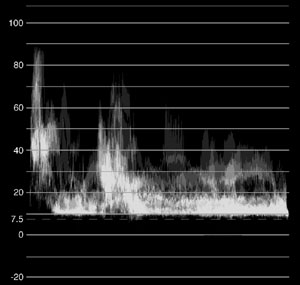

An easy way to tell what the black level is for your system is to feed "filler" (black signal the system generates when there is no video) to the waveform monitor.

With the brightest and darkest parts of the image judged by legal levels, the gamma or midrange is the tonal range that can be set to ensure the shot has its true overall tone.
"Think of your tonal range as a rubber band."
Once tonal range is set, the next step is to balance the colours.
Black white and grey are exactly in the middle of the vectorscope which means they have no saturation.

The focus of the Colour balancing stage is making to ensure that the colours that are supposed to be neutral, are neutral.
"Equal levels of red, green, and blue means there is no saturation."
gamma response of a computer display is different from a TV set or video monitor.
Setting your monitor to black and white is a way you can refresh your perspective.
computer LCD screens should be set to a 2.2 gamma setting and should use D65 standard for white.
"Parade displays are as important in obtaining chroma information as luminance information."
Ensure the colours you are trying to balance are actually neutral.
With the brightest and darkest parts of the image judged by legal levels, the gamma or midrange is the tonal range that can be set to ensure the shot has its true overall tone.
"Think of your tonal range as a rubber band."
Once tonal range is set, the next step is to balance the colours.
Black white and grey are exactly in the middle of the vectorscope which means they have no saturation.
The focus of the Colour balancing stage is making to ensure that the colours that are supposed to be neutral, are neutral.
"Equal levels of red, green, and blue means there is no saturation."
gamma response of a computer display is different from a TV set or video monitor.
Setting your monitor to black and white is a way you can refresh your perspective.
computer LCD screens should be set to a 2.2 gamma setting and should use D65 standard for white.
"Parade displays are as important in obtaining chroma information as luminance information."
Ensure the colours you are trying to balance are actually neutral.

No comments:
Post a Comment